Deep Dive into PAC Files: Advanced Features and Best Practices for Effective Proxy Configuration - Part 2 of 4
Welcome to the second installment of this blog series on PAC files. In the previous post Understanding PAC Files: An Introduction to Dynamic Proxy Configuration, we explored the fundamental elements of PAC files, their purpose, and the structure that defines them. Now, let's dive deeper into the world of PAC files and discover how to create, configure, and harness their power for effective web proxy configuration. In this post, we'll explore the syntax and logic of conditional statements in PAC files, uncover advanced features and techniques, and discuss best practices for managing and maintaining PAC files. By the end of this post, you'll have a comprehensive understanding of the inner workings of PAC files and be equipped with practical knowledge to optimize their usage in your organization's web proxy setup.
While authoring this post, as I was coming up with topics, I had the thought to myself, "what's the difference between creating and configuring a PAC file?". Upon doing some research and discussing this further with my peers, I found it is worth covering both aspects. The creation of a PAC file is the initial file creation, but also the writing of the logic, policies, and other content of the PAC file itself. The configuration aspect of a PAC file is more focused on how to integrate your newly created PAC file into your organization's infrastructure.
The first topic we're going to cover in this post is the creation and configuration of a PAC file. When it comes to creating a PAC file, there are several key steps to keep in mind when defining the proxy configuration logic. Most importantly, as with any IT-related project or initiative, planning is key to a successful implementation. Developing web proxy configurations is something that can have immense impact on business continuity, both positive and negative, and should not be implemented on a whim without careful thought and consideration. Before delving into the code, it's important to consider the network architecture, the proxy server infrastructure you will be interacting with, and the specific needs of the organization.
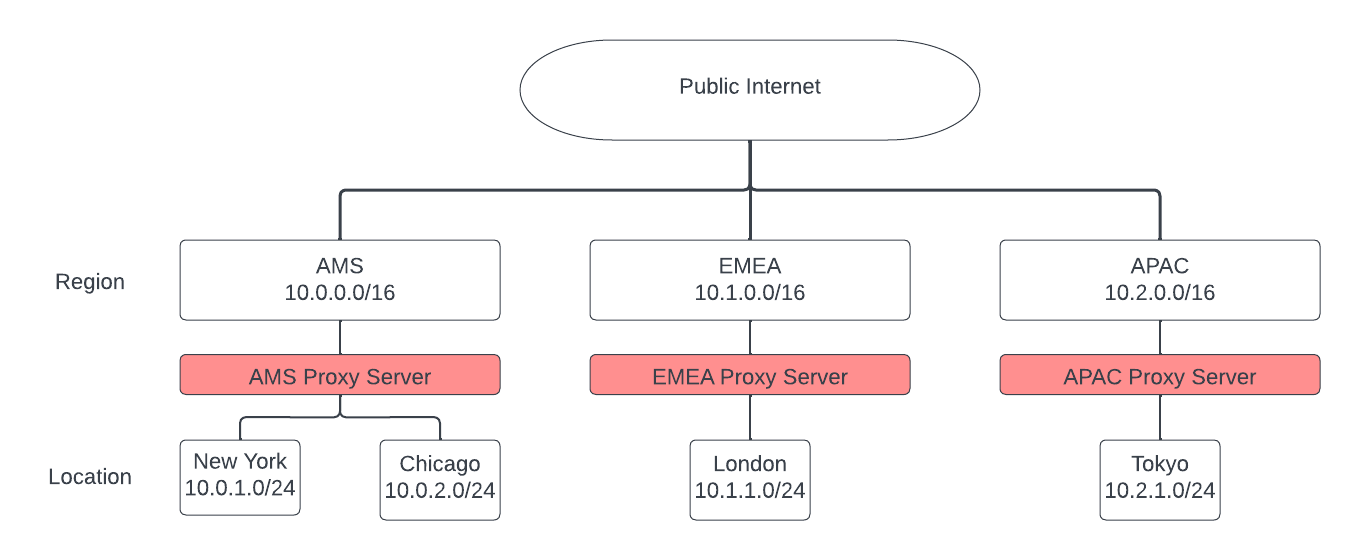
As we delve into the planning, creation, and configuration of our PAC file in this series, we'll use the sample architecture shown in the image below. While it is drastically simplified, this architecture provides us with a workable model that is similar in nature to a typical global enterprise.
To create and configure a PAC file, you will need to have a good understanding of JavaScript syntax and the available functions for proxy configuration. The first step is to open a text editor and create a new file with a ".pac" extension. This file will serve as your PAC file. Within the PAC file, you can start writing the JavaScript code that defines the proxy configuration logic. This code will include conditional statements, functions, and variables to determine how web traffic should be routed as we discussed in the first post. You can define specific rules based on time, domain, or other conditions to direct traffic to the appropriate proxy server or bypass it altogether. Once you have written the logic, save the PAC file and ensure it has a unique and meaningful name.
For example, below is a sample PAC file for our AMS locations. This is a very basic PAC configuration that, if the machine using this PAC file has an IP address in the 10.0.0.0/16 address space, will send all web traffic to the proxy server us-proxy.example.com on port TCP/8080.
touch ams-proxy-cfg.pac
function FindProxyForURL(url, host) {
  // US-based location
  if (isInNet(myIpAddress(), "10.0.0.0", "255.255.0.0")) {
    return "PROXY us-proxy.example.com:8080";
  }

  // Default proxy configuration
  return "DIRECT";
}
With the PAC file created, you can then proceed to configure it within your organization's web proxy infrastructure, such as specifying the PAC file URL in the browser settings or distributing it through group policies. This ensures that the PAC file is applied and used by the browsers to dynamically configure proxy settings based on the defined rules and conditions. It is important to understand that there are many ways to distribute a PAC file to an organization, but PAC files can also be manually applied to a web browser on a user-by-user basis. While most organizations will want to deploy a PAC file via a GPO (Group Policy Object) or MDM (Mobile Device Management) platform, we'll cover manual deployment in more detail in order to provide information on the process, and we will cover mass-deployment options at a higher level.
Manual configuration of a PAC file in a web browser is a very straightforward process. While I'm going to be using Mozilla Firefox in my example, the process is very similar in most major browsers, you just have to find the appropriate settings menu. Within the Firefox browser, open the browser settings and navigate to the Network Settings section. As you can see in the image below, by default, Mozilla Firefox follows the System Proxy Settings. In another post we will discuss the pros and cons to using system proxy settings vs. browser-based proxy settings, however, it is important to know, that there is a difference.
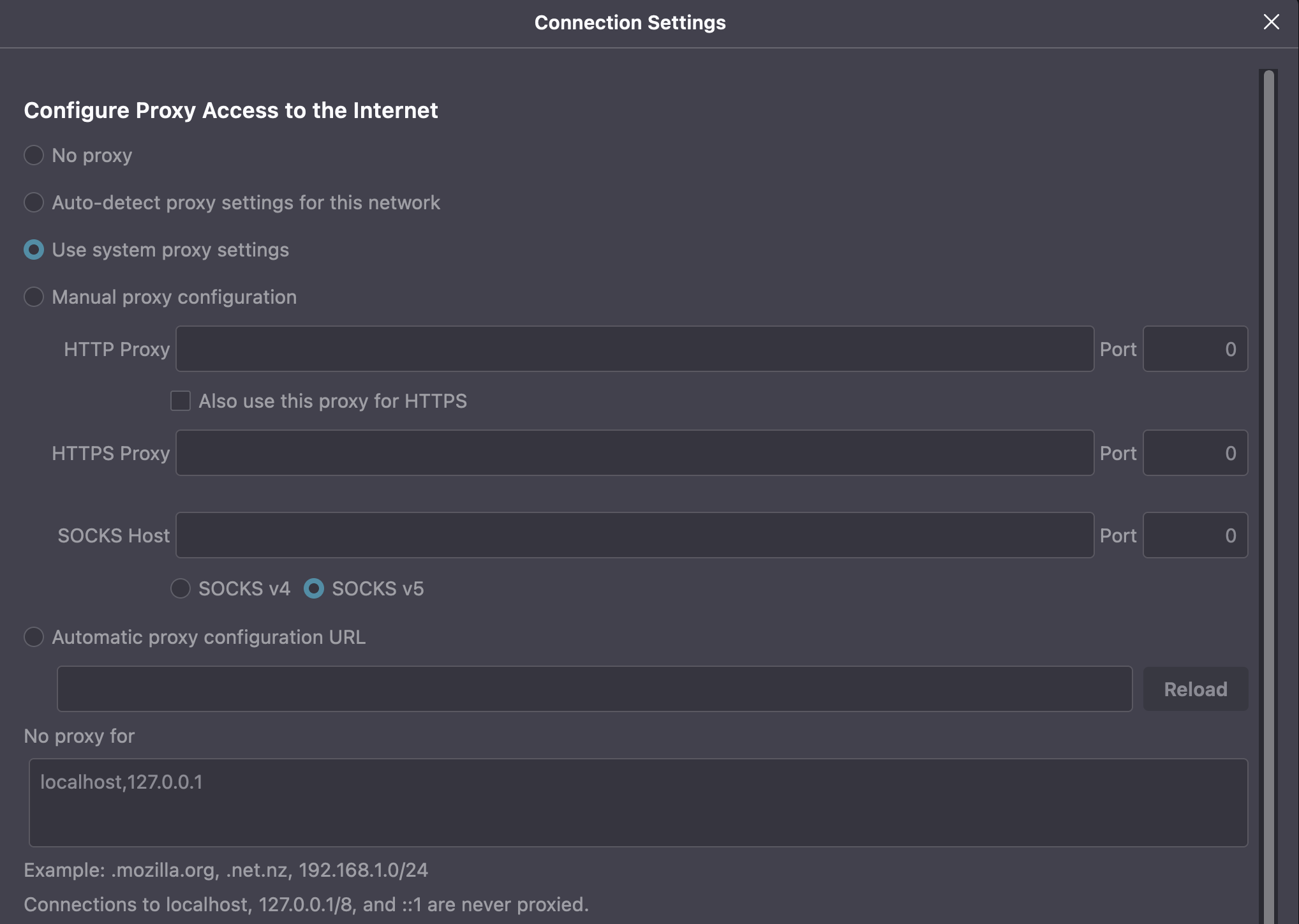
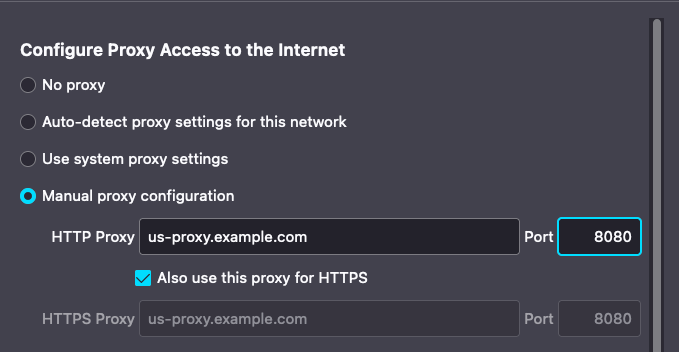
Notice that in these configuration options there is the option to manually set a web proxy server for both HTTP and HTTPS traffic. If we chose to take this approach and configure the proxy settings as shown below, the configuration would still be effective in getting all of the browser's traffic to the proxy server, however, we would lose out on the benefits of things like conditional statements and dynamic forwarding rules that we gain from PAC files.
Further down the options menu we see the field for Automatic Proxy Configuration URL. This is where the magic of the PAC files begins. Once the file has been created, the administrator must host the file on a web server accessible by company assets. In this case, we're going to go on the assumption that the PAC file is hosted at http://synically-ackward.com/pac-part-2/proxy/us-proxy-cfg.pac.
📘
These PAC files referenced are available for download on GitHub. Be aware however, while you may download them, and look at them, do not apply them to a browser as a PAC configuration. With the proxy server being example.com your traffic will be black-holed until the proxy configuration is removed if you match the conditionals.
As shown in the configuration options below, we provide this URL in the browser settings, and the browser will automatically reach out and retrieve the PAC file each time it needs to reference the logic. This allows us to maintain a much smaller amount of PAC files, and, to make dynamic updates to the files which will automatically be honored once the browser pulls the updated file.
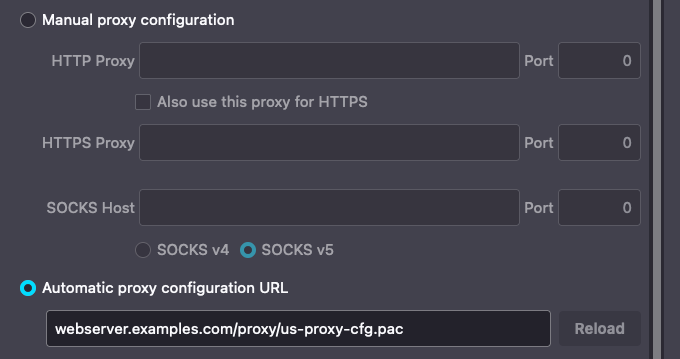
Based on the logic currently contained in our PAC file for our AMS users, the browser will identify if the machine in use has an IP address in the 10.0.0.0/16 address space, and, if so, it will forward the web traffic to our proxy server on port TCP/8080. However, if the machine IP is not within that range, for instance, our user could be at home and have a 192.168.0.0/16 address, the traffic will be forwarded directly to the internet with no proxy server in the path. Once a browser has been directed to the Automatic Proxy Configuration URL, the manual configuration of the browser is now complete.
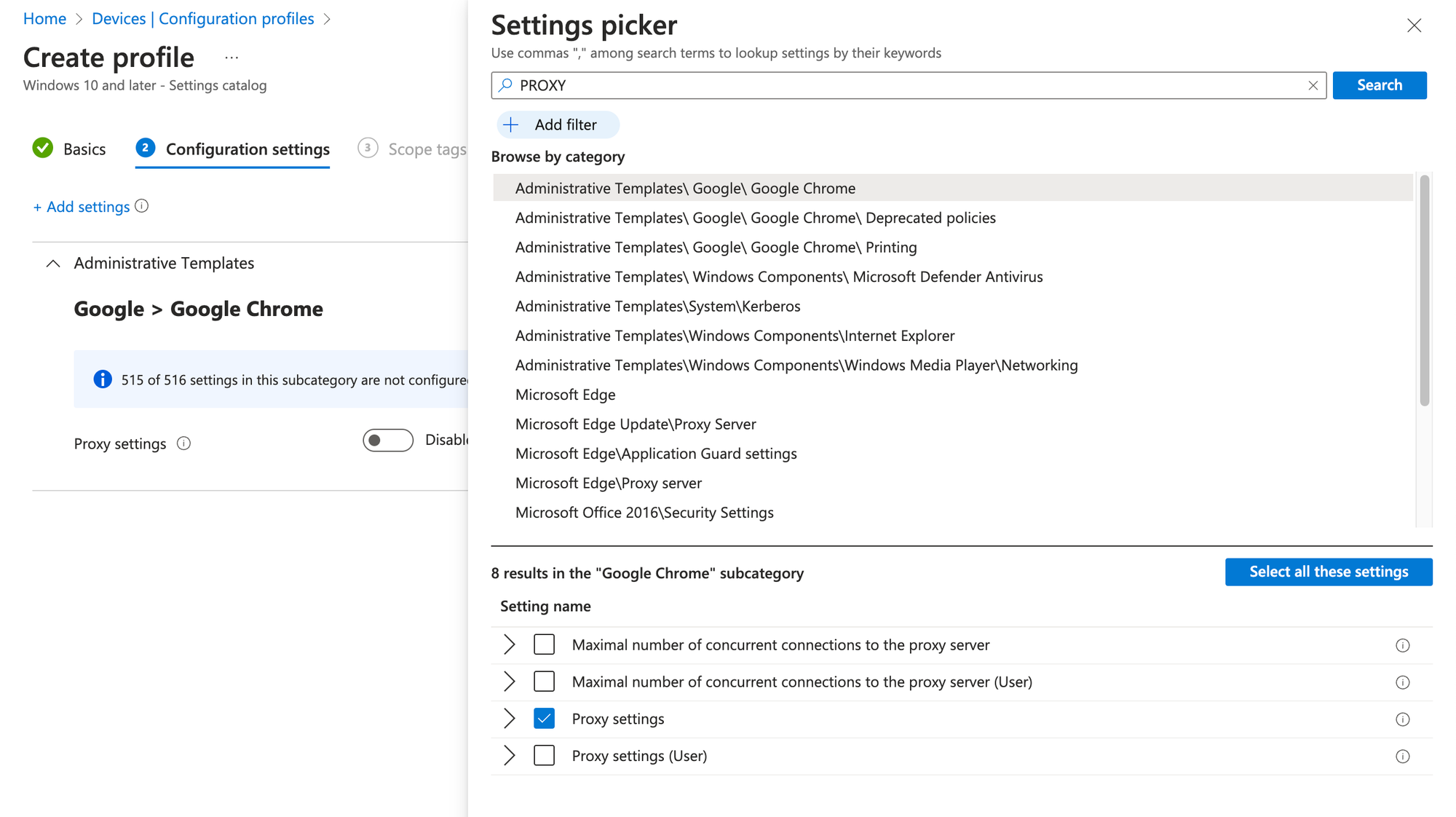
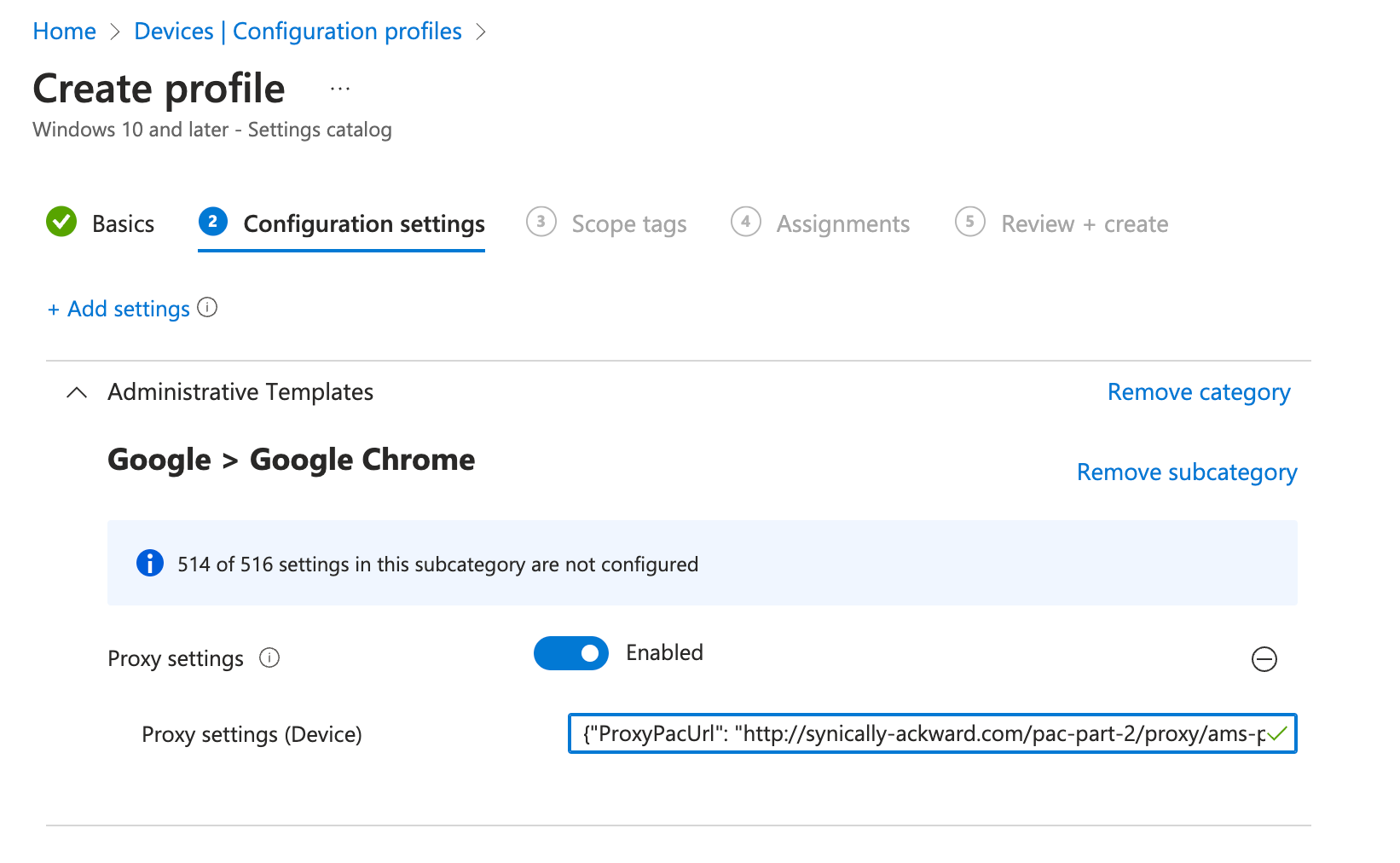
As mentioned previously, it is generally in an organization's best interests to deploy their PAC files en-masse utilizing a GPO, MDM or other deployment mechanism. As an example, I've included an image below from Microsoft's InTune MDM on what a basic configuration would look like of a proxy configuration for Google Chrome Enterprise on Windows Platforms. This policy could be pushed out to all users, or a subset based on various criteria and used as a mechanism to distribute the PAC files appropriately.
Now that we have covered the essential steps in creating and configuring a PAC file, let's explore some advanced features and techniques that can further enhance the capabilities of PAC files. These advanced techniques allow for more precise control over proxy configurations, dynamic integration with external data sources, and the integration of additional security mechanisms. By leveraging these advanced features, organizations can unlock the full potential of PAC files and tailor their proxy configurations to meet specific requirements. Let's dive into these powerful capabilities and explore how they can take PAC files to the next level.
In addition to the foundational concepts we covered in the previous post, PAC files offer a range of advanced features and techniques that can further enhance their functionality. One such feature is the use of regular expressions for more flexible and precise pattern matching in conditional statements. Regular expressions enable you to define complex patterns to match URLs or domains, allowing for more granular control over proxy configuration. Another powerful capability is the ability to leverage external data sources within PAC files. By integrating with external resources, such as databases or APIs, you can dynamically retrieve and update proxy configurations based on real-time information. Furthermore, PAC files can be integrated with other security mechanisms, such as content filtering solutions or threat intelligence feeds, to enforce additional security policies. These advanced features empower organizations to create highly dynamic and adaptive proxy configurations tailored to their specific needs.
In order to discuss these more advanced features of PAC files, we're going to build on our original ams-proxy-cfg.pac file. For the purposes of the post, and so they are both available for download, we'll rename this new iteration ams-proxy-cfg-adv.pac. The contents of the file can be seen below, and we will take a look piece-by-piece at the new functionality that we've included:
// Helper function to check if a URL matches a specific pattern
function matchURLPattern(url, pattern) {
  var regex = new RegExp(pattern);
  return regex.test(url);
}

// Time-based proxy configuration
function configureProxyByTime(url, host) {
  var currentHour = new Date().getHours();
  if (currentHour >= 9 && currentHour < 17) {
    return "PROXY proxy1.example.com:8080";
  } else {
    return "DIRECT";
  }
}

// Domain-based proxy configuration
function configureProxyByDomain(url, host) {
  var blockedDomains = ["blocked-site1.com", "blocked-site2.com"];
  for (var i = 0; i < blockedDomains.length; i++) {
    if (dnsDomainIs(host, blockedDomains[i])) {
      return "PROXY proxy2.example.com:8080";
    }
  }

  return "DIRECT";
}

// Custom condition based on URL pattern
function configureProxyByURLPattern(url, host) {
  if (matchURLPattern(url, "^https://internal.example.com")) {
    return "PROXY proxy3.example.com:8080";
  } else {
    return "DIRECT";
  }
}

// Main function to decide proxy configuration
function FindProxyForURL(url, host) {
  // Time-based proxy configuration
  var timeBasedProxy = configureProxyByTime(url, host);
  if (timeBasedProxy !== "DIRECT") {
    return timeBasedProxy;
  }

  // Domain-based proxy configuration
  var domainBasedProxy = configureProxyByDomain(url, host);
  if (domainBasedProxy !== "DIRECT") {
    return domainBasedProxy;
  }

  // Custom condition based on URL pattern
  var urlPatternProxy = configureProxyByURLPattern(url, host);
  if (urlPatternProxy !== "DIRECT") {
    return urlPatternProxy;
  }

  // Default proxy configuration
  return "PROXY proxy4.example.com:8080";
}
In this new iteration of our file, we see the introduction and usage of a couple new concepts. Let's go through them in order to better understand what the PAC file is instructing the browser to do.
📘
Remember that the functionality of the PAC file truly begins at the FindProxyForURL() function. We've added quite a few helper functions above that which will be discussed and referenced within the main function.
The first addition to note is the helper function matchURLPattern(). This is a perfect example of a core helper function that can be used in a PAC file to determine if a URL matches a certain syntax. In this case, the function is quite simple; the browser provides the PAC logic engine with the URL that is being requested and then, based on policy, that URL is matched against a variable called pattern. If a match is present, an action is taken, if a match is not present, the logic of the PAC file will continue to flow.
// Helper function to check if a URL matches a specific pattern
function matchURLPattern(url, pattern) {
  var regex = new RegExp(pattern);
  return regex.test(url);
}
It is important to understand that typically helper functions are those that are not inherently a part of PAC file logic. In this case, the ability to evaluate a URL against a Regular Expression (RegEx) is not a built in PAC function, so, a helper function must be written to achieve this outcome. As we can see with our next example configureProxyByTime() this is also necessary for applying Proxy configuration based on time constraints. As we can see in the example below, the var currentHour is analyzed to see if it falls between the hours of the system's local time 9am - 5pm. If yes, a proxy server proxy1.example.com:8080 is returned and the traffic is directed accordingly. If outside these hours, the logic of the PAC file continues to be processed. For the sake of brevity, the configureProxyByDomain() functions in very much the same way, so I won't repeat my explanation.
// Time-based proxy configuration
function configureProxyByTime(url, host) {
  var currentHour = new Date().getHours();
  if (currentHour >= 9 && currentHour < 17) {
    return "PROXY proxy1.example.com:8080";
  } else {
    return "DIRECT";
  }
}
I will highlight our fourth helper function, configureProxyByURLPattern(), however, as it is a great example of how one helper function can reference another in order to be re-used within a PAC file. In this case, the helper function shown below references our first created helper function matchURLPattern() in order to process its logic. In this case, in the evaluation of this function, we have provided the pattern ^"<https://internal.example.com>" to be matched against the URL a user is attempting to access. In this case, this may be an intranet site that should be handled differently than typical web traffic, and therefore be sent to a different proxy server.
function configureProxyByURLPattern(url, host) {
  if (matchURLPattern(url, "^https://internal.example.com")) {
    return "PROXY proxy3.example.com:8080";
  } else {
    return "DIRECT";
  }
}
⚠️
It is important to remember that JavaScript is a sequential programming language. In this case, if the helper function matchURLPattern() had been written after the function configureProxyByURLPattern() the parsing of the PAC file logic would fail.
Looking at the PAC file logic we can see that within the main function FindProxyForURL() we execute our helper functions sequentially to determine how the traffic should be treated, and, based on these conditions, our traffic could be directed to any one of four proxy servers depending on the criteria that is matched as true. This is a high-level example of how advanced PAC parsing logic works, but it should illustrate the power of these dynamic capabilities.
Now that we have explored the creation, configuration, and advanced features of PAC files, it's important to discuss best practices for effectively managing and maintaining them. PAC files can become complex as the proxy configuration logic evolves, and their proper management is crucial for ensuring consistent and reliable web proxy functionality. In this section, we'll delve into four key best practices that will help you streamline the management process, ensure the integrity of your PAC files, and facilitate efficient maintenance.
One of the primary best practices often overlooked in enterprises, not just related to PAC files, is the implementation of proper version control. By utilizing a version control mechanism such as Git, changes can be tracked, and team members can collaborate effectively while still maintaining the ability to revert to known-working versions. This ensures a reliable history of modifications and can prevent in-depth troubleshooting when a configuration change causes issues for end users. Maintaining version control for PAC files simplifies management and decreases the amount of troubleshooting related to PAC file issues.
Another crucial best practice is accurate and comprehensive documentation and commenting of PAC files. Documenting the purpose, logic, and specific considerations for each section of the PAC file helps future administrators understand its functionality and make modifications with confidence. Adding comments within the PAC file itself provides clarity and context for different sections of the code, making it easier to understand and modify in the future. In the provided examples, comments are included for each helper function, identifying its purpose within the PAC logic. These comments can guide administrators, especially those unfamiliar with PAC files, when making modifications or troubleshooting.
The third practice to highlight is the use of testing and validation. It is important to test and validate PAC files both when changes are made and on a regular basis to ensure the functional capability of the platforms in use. This includes validating the proxy configuration logic, verifying that the PAC file is correctly applied by browsers, continually validating PAC file reachability, and testing different scenarios and conditions to ensure expected behavior. Implementing a robust testing process helps catch potential issues early on and ensures a smooth user experience.
Lastly, monitoring and alerting are crucial practices to ensure the proactive identification of issues. Automated processes for testing and validation are beneficial, but they need to be complemented by a monitoring and alerting system. Setting up such a system enables proactive identification of any issues or anomalies within your PAC files. It includes monitoring the availability and performance of proxy servers, monitoring PAC file application status, and setting up alerts for any unexpected behavior. By monitoring and being alerted to potential issues, you can address them promptly and minimize any impact on users.
These best practices — version control, documentation, testing & validation, & monitoring and alerting — play a vital role in managing and maintaining PAC files effectively, ensuring their reliability and optimal performance.
In this post, we explored the creation, configuration, and advanced features of PAC files, gaining a comprehensive understanding of their structure, syntax, and logic. We discussed the importance of planning and considering network architecture when creating a PAC file, as well as the various methods for configuring and deploying PAC files within an organization. Furthermore, we examined advanced capabilities such as time-based and domain-based decision-making, enhancing the flexibility and power of PAC files. Lastly, we discussed best practices for managing and maintaining PAC files, emphasizing the significance of version control, documentation, testing, and monitoring. In the next installment of this series, we will delve into the security considerations of PAC files, including potential risks, mitigation strategies, and best practices for ensuring a secure implementation. Stay tuned as we explore the crucial topic of security in PAC files.